

 By
By 
- Business automation isn’t one tool. It’s how work, data, and decisions move across your whole business without needing a person to push them along at every step.
- Small manual tasks scale badly. A two-minute task done 300 times a month becomes 10 hours a month, and that number only grows as the business does.
- People constantly misread the “half of all jobs will be automated” headline. Most research on this actually measures tasks inside a role, not entire jobs disappearing.
- Sales, support, finance, and e-commerce all carry the same underlying problem, just dressed differently. Once a business fixes it in one department, the pattern is easy to spot everywhere else.
- Start with one small process, not a whole department. Pick something low-risk and high-frequency, prove that it works, and let that early win build the case for automating more.
THE BASICS
What is Business Automation?
Business automation refers to the method of enabling the circulation of information, decisions, and handoffs throughout an entire company without getting bottlenecked at every step by a person’s decision.
In brief, it’s a lead moving from your website, into your CRM, then in front of the right salesperson, through a follow-up sequence, and eventually into a signed deal, with a person stepping in only where a decision genuinely needs one. Every other handoff happens on its own, in the background, without anyone chasing it down.
That’s a meaningfully bigger idea than just automation, and it’s a good thing to be clear about the difference. Furthermore, simple automation usually consists of a single trigger tied to a single action, filling a form, sending an email, and one small handoff between two tools. That’s where automation, on its own, can end up feeling smaller than it really needs to be.
Business automation takes that same idea, but applies it across an entire process, sometimes an entire department. Instead just automating a task, it automates the whole chain that task is a part of. In effect, it’s closer to redesigning how work flows through the business, to ensure growth doesn’t automatically mean hiring more people just to move information around.
And that’s what The Brihaspati Infotech spends most of its time on, not wiring up these single triggers, but rather rebuilding how a process runs, from end to end. In practice, this tends to come in three different depths:
| Type | What It Actually Covers |
|---|---|
| Process automation (BPA) | Connects a full workflow across departments, order-to-delivery, employee onboarding, approvals that touch more than one team. |
| Robotic process automation (RPA) | Software that mimics manual clicks and keystrokes inside existing tools , moving data between two systems that don’t talk to each other natively. |
| Marketing automation | Email sequences, lead scoring, and campaign triggers that fire based on what a visitor or customer does. |
| Sales automation | CRM updates, follow-up reminders, and pipeline tracking that happen without a salesperson manually logging each step. |
| IT process automation | Server monitoring, backups, and ticket routing, the behind-the-scenes work that keeps systems running. |
| Document and workflow automation | Approvals, e-signatures, and contract routing that move on their own instead of sitting in someone’s inbox. |
| AI-powered automation | The layer that needs judgment rather than a fixed rule, classifying messages, extracting data, or drafting a first response. |
Most companies stop at the first depth, simply because it’s the easiest to spot. The real payoff, however, tends to sit in the second and third layers, in a process nobody’s ever mapped, let alone connected properly. That gap is usually where The Brihaspati Infotech works.
THE HIDDEN COST
Why does manual work cost more than you think?
A task, done once, rarely feels like a problem. The trouble is, businesses almost never do a task just once, the same request lands again tomorrow, and the day after that, in more or less the same shape.
Take a moment to add it up. Copying a name into a spreadsheet takes roughly thirty seconds. A routine follow-up email takes about two minutes. Checking on an order takes close to a minute. None of that looks like much on its own. Multiply any one of them by a few hundred repeats a month, though, completely normal for a busy team, and the total quietly turns into a full-time role nobody actually planned for.
That cost tends to surface in three different places, none of which show up cleanly on a budget:
| Cost | What It Looks Like |
|---|---|
| Lost time | Hours spent on data entry and routine emails are hours your team isn’t spending on customers, sales conversations, or improving the product itself. |
| Slower responses | Customers don’t know your team is short-staffed or juggling five other tasks. They just see a delay, and move on to whichever business responded first. |
| Mistakes found too late | A copy-paste error or a missed follow-up rarely costs anything the moment it happens. It costs you three weeks later, when a client asks why their order never shipped. |
Because none of this appears as a clean line item anywhere, it tends to go unnoticed for far longer than it should, right up until the whole team feels stretched thin, even if nobody can point to exactly why.
THE DATA
Will most jobs be automated?
Obviously not. In fact, it’s crucial to address this point, as it’s often the first objection a business will raise before automating any process.
The McKinsey Global Institute published a report at the end of November 2025. The report titled “Agents, Robots, and Us: Skill Partnerships in the Age of AI” found that today’s AI could, in theory, automate about 57% of US work hours, 44% of that from AI agents, and 13% from physical robots.
There are two critical observations to make about this statement beyond the surface level:
01
It’s a ceiling, not a prediction
Outlines what’s technically possible in ideal conditions, not actual outcomes or timelines for businesses.
02
It’s about tasks, not jobs
Automation removes repetitive tasks, letting sales people focus on relationships and closing deals.
The latter is, by far, the most important point to remember as an automation, at least for now, tends to take away the repetitive aspect of a process leaving the judgment calls untouched.
IN PRACTICE
What does this look like in a real workflow?
Consider a bsuiness that gets new leads or listings from an external source daily, arriving at inconsistent times throughout the day. Naturally, following up can pile up fast when each one is sorted manually, pausing current work to check for listings, research contacts, send outreach, and file everything away.
The necessary task can quietly eat hours. With automation, however, those emails would sort themselves, route to the right person, and file automatically, no extra work required. And if any step fails, the listing stays accessible elsewhere instead of getting lost entirely.
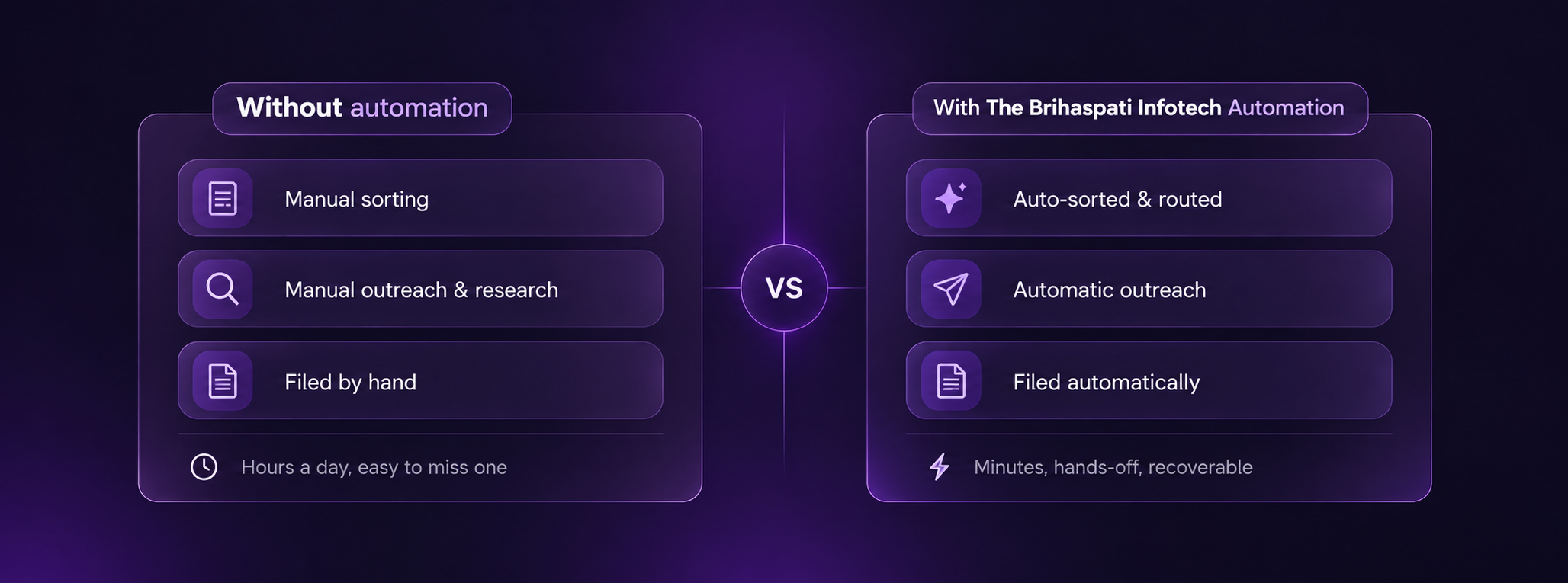
This exactly what The Brihaspati Infotech designs for businesses: automated workflows with a built-in fallback, so nothing slips through by accident. Beyond saving time, it also means no one has to sit around manually sorting through listings.
Ultimately, The Brihaspati Infotech Builds automations that handles these mundane tasks, freeing people to spend that reclaimed time on something more worthwhile.
WHERE IT PAYS OFF
Which department can save the most time?
Move from department to department and the nature of the task varies, but the underlying shape of the problem barely does.
| Department | What’s Manual Today | What Automation Changes |
|---|---|---|
| Sales & marketing | Checking forms, entering leads by hand, remembering follow-ups | Leads are sorted and assigned automatically, and follow-ups go out on schedule without anyone needing to remember them. |
| E-commerce | Updating stock, processing orders, notifying customers manually | Inventory, orders, and notifications stay in sync across channels without extra manual work. |
| Customer support | Reading and sorting every request by hand before responding | Requests are sorted, routed, and acknowledged instantly, so nothing sits unread in a queue. |
| Finance & operations | Sending invoices, chasing payments, building reports manually | Invoices go out, reminders are sent, and reports are ready on a set schedule, without last-minute scrambling. |
This doesn’t specifically aim to reduce headcount. Instead, it emphasizes what as an individual can achieve in an hour that was previously spent entirely on spreadsheets. At The Brihaspati Infotech, the discussion typically begins by highlighting one department where time is being lost most rapidly.
Not every department is a candidate for improvement at once, and this is why the question is useful, which of these things is your team currently doing by hand, or how often does it actually happen?
GETTING STARTED
How do you start automating your business?
Getting started requires no staffed developer. It takes four straightforward steps, and you have to follow them in a specific order.

Find the friction
Identify friction points by asking the team what repetitive tasks they dislike.

Map the process
Document the process step-by-step to reveal automatable tasks and those needing human input.

Start small
Choose one simple, low-risk process to automate for initial trust-building.

Plan for what goes wrong
Plan responses for potential issues in the workflow to maintain trust in automation.
If it took longer than expected to map out a single process, there is no reason to worry. This is the primary task that The Brihaspati Infotech offers to businesses before they implement any automated processes.
THE FIX
How Does The Brihaspati Infotech Fit In?
Presently, most companies have the tools they need to operate, a CRM, an accounting software, a website, a set of Excel sheets. However, the problem is rarely one of lacking a tool. Since these tools rarely communicate with each other, people need to transfer information between them, manually.
Therefore gap that The Brihaspati Infotech fills is the space between the tools, and it usually involves creating a set of processes that allow people to manage the information between systems without error. Most often, it includes the following points:
01
Process discovery
Understanding your actual operations within the business often reveals significant differences from the way you are expected to operate on paper.
02
Custom automation
Built around your existing process, instead of forcing your team to change how they already work.
03
System integration
Connecting tools and platforms that designers never intended to communicate with each other directly.
04
AI-powered workflows
For the parts of a process that need some judgment, like sorting messages by intent or pulling key information out of documents.
05
Ongoing support
Because workflows can quietly break over time, and someone needs to be watching to keep them running properly.
Processes always come before tools. A company cannot develop new software without understanding the task. Therefore, The Brihaspati Infotech always asks a client about their current processes during the discovery stage rather than promising to solve problems with prepared tools.
THE TAKEAWAY
What Should You Automate First?
Henceforth, the biggest opportunity rarely involves the most complex process in the business. Your team frequently reflects on why the tasks they perform daily remain unautomated, and they do so without pause.
The real question then is not whether a business should automate, most eventually do in one way or another. Rather, which task to automate first, and most business owners instinctively suspect the answer before they articulate it: whatever process is quietly bleeding the most time this week.
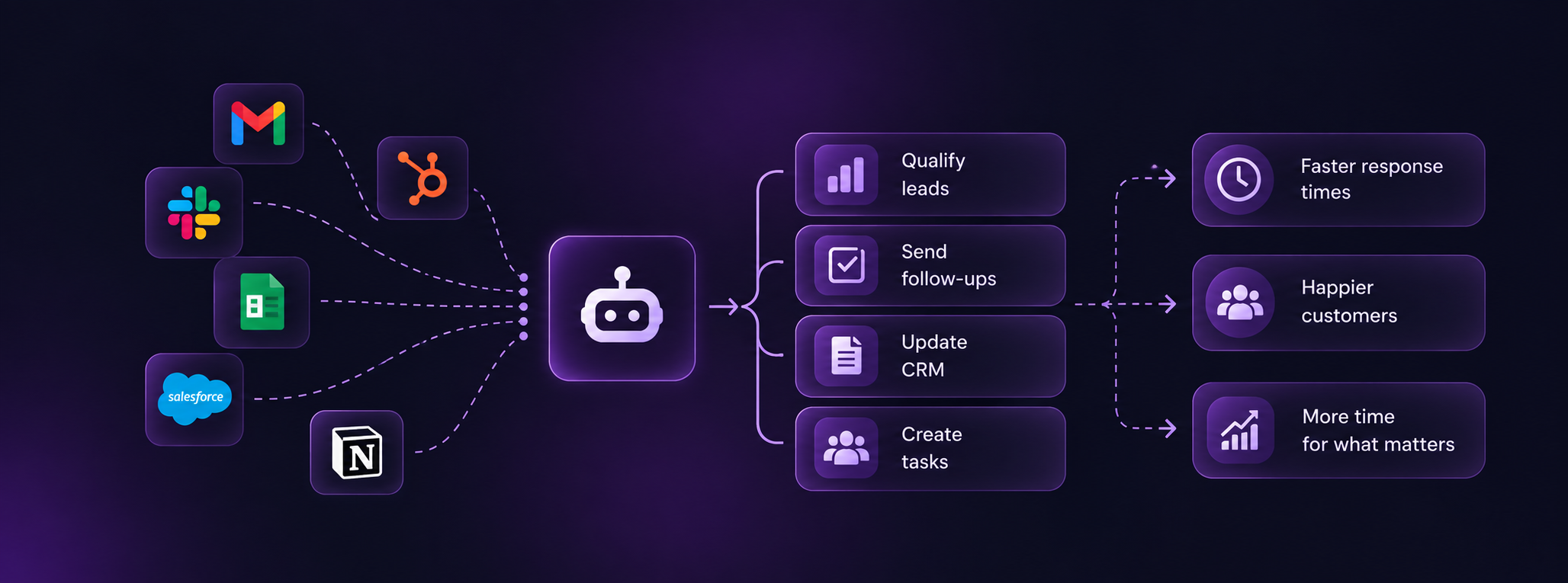
So Jovian, The Brihaspati Infotech’s AI Assistant, was designed to answer this question. In a matter of minutes, Jovian analyzes the current state of your business to provide a clear, actionable overview of where automating and implementing AI solutions would generate the most value, before you invest any resources into development. If you’re not sure what to prioritize, this is a good place to start.
Disclaimer: References to third-party products or companies are informational and do not imply affiliation, association, endorsement or partnership.