

 By
By 
- Every approved construction job passed through seven manual steps before anyone was contacted — checking records, pulling contractor details, finding emails, sending, tracking.
- The Brihaspati Infotech connected all ten stages in n8n: BCI Central API in, filtering and batch processing in the middle, tracked outreach through Brevo out.
- Batch processing moved records through in controlled groups, so one failure never stopped the run.
- A separate error-tracking sheet caught every record the workflow couldn’t complete, instead of letting it disappear or reach outreach half-built.
- Lead generation increased 3×. The automation didn’t create leads — it returned the hours needed to chase them.
When Routine Work Starts Eating Into Growth
For this particular client, business meant reaching out. Each time an opportunity of construction was approved, the appropriate contractors and sub-contractors had to be found and reached out to — fast, before others beat you to it.
What went wrong was the methodology of that process. Opportunities had to be searched for manually, documents had to be reviewed to pick the relevant records, contact details had to be collected and then emails had to be drafted and sent to each contractor.
Sending one email at a time means nothing, but performing that entire process of seven steps repeatedly throughout the day becomes hours of administration done before any selling begins.
All those hours of work could have been spent on opportunity generation and follow-up. Revenue generating tasks were being compromised by support work.
The Brihaspati Infotech began its work on this client with a question rather than a solution: “Exactly, what is your process?”
Finding the Right Process to Automate
The first task was to diagram the existing workflow before drafting any solution. It appeared quite predictable:
Approving job → identifying the relevant records → finding the contractor info → preparing contact → sending an email → changing the status
A predictable workflow is easily automated. Judgements cannot be automated. There were no judgements in this particular process.
It was important to understand that emails were not the root cause of the problem. Email delivery was just one step among seven. The other six – data collection, data filtering, API integration, batching, preparing contacts, and contact tracking – constituted the bulk of the daily routine. Automating just the emails would have fixed the tiniest part of the problem.
Hence, the new aim became to transport data from the source to the point of contact with minimal human intervention.
The Challenge: Turning Approved Jobs Into Outreach
The client received newly approved job information through BCI Central (now Hubexo), a construction project data platform. Getting the data was never the issue. Turning it into outreach was.
With each new batch, there was always the need to:
- Identify the new approvals
- Determine which documents should be processed
- Identify the contractors/subcontractors involved
- Determine who was still reachable
- Prepare the contact information for communication
- Send the message out
- Record what had been processed
Seven processes, to be done every time there were a new set of job approvals.
There were two challenges in doing the task. The first one was sheer volume – all seven tasks took about a minute or two each and when put together, consumed a whole day’s worth of time. The second challenge was the lack of a unified system that would allow them to see all the processes from start to finish.
The automation solution could not simply involve sending an email button.
The Solution: Connecting the Workflow With n8n
The Brihaspati Infotech built the workflow in n8n, an open-source workflow automation tool.
The choice mattered for one reason: the client’s existing systems worked. Replacing them would have meant retraining, migration and risk. n8n connected what was already there instead.
Ten stages, four systems, no manual handovers:
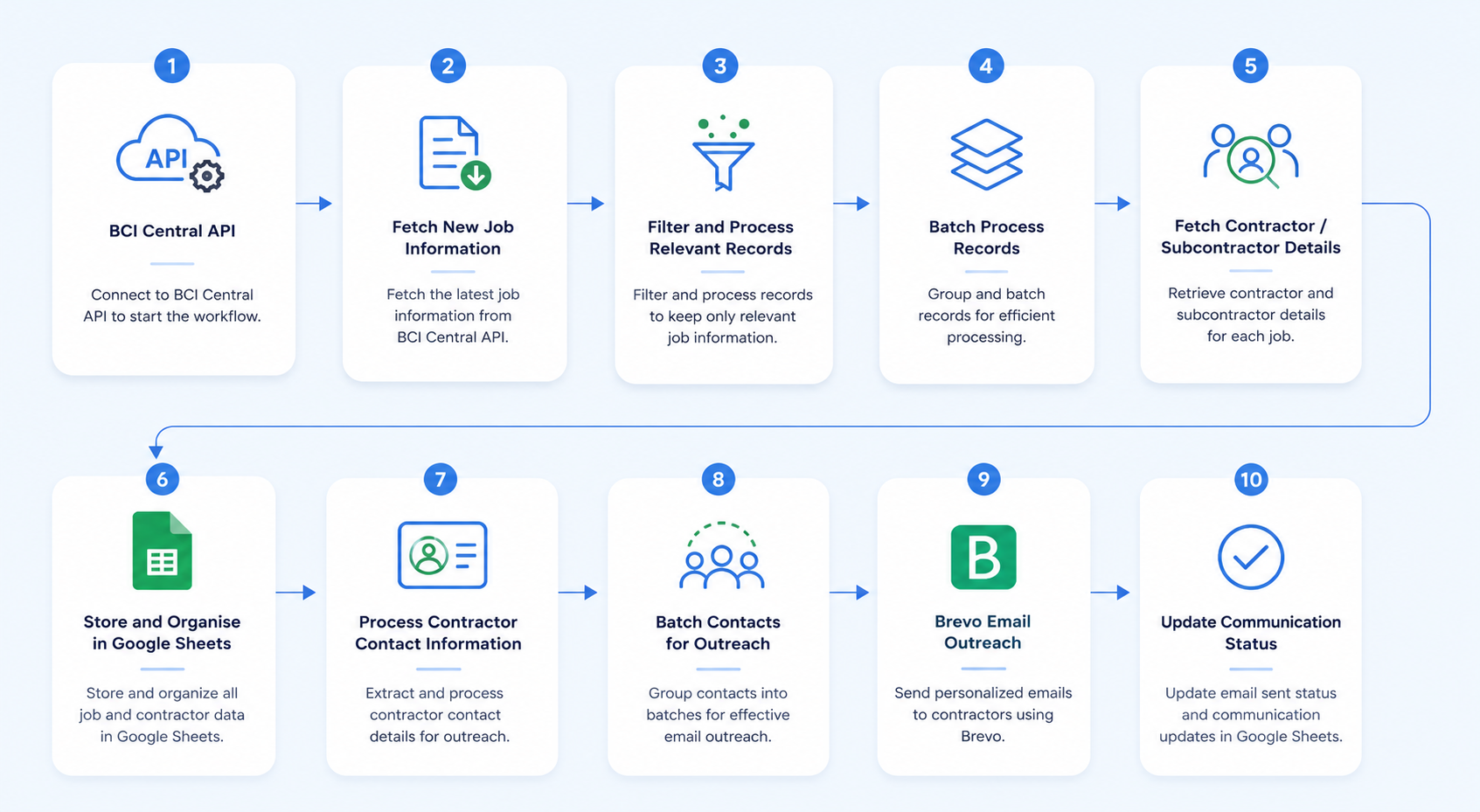
Three decisions did the heavy lifting.
Batch processing. Records moved through in controlled groups rather than all at once. This keeps API requests within limits and isolates failures — if one batch hits a problem, the rest keep moving.
Google Sheets as the working layer. Not the most sophisticated option, the right one here. The client could open a sheet and see what the automation had done, without a new dashboard or another login.
Brevo for outreach. Handled sending and returned delivery status, which fed back into the tracking step.
The client stopped moving information between systems and stopped sending emails one at a time.
Planning for What Fails
Ideal-case automation cannot last in the face of real-world data. Sometimes contractor data won’t load. Contact info will be missing sometimes. Unexpected result comes from a query to an API. In a daily workflow process, this is not an edge case – it happens weekly.
There were two undesirable results to avoid here: silent loss of records and a single error preventing all other actions in the run.
That’s why a separate Google Sheet for tracking errors has been created. Whenever a record could not be retrieved in the workflow, it went to that sheet instead of being lost or forwarded unfinished.
This gave a clear dichotomy:
- Successfully processed – no need for any further action
- Requires attention – stored separately in one place to review
Now the client checks just one sheet rather than audit an entire workflow process to spot the missing data. In addition, the automation prevents unfinished records from going through to the outreach stage – a partially filled-in email is worse than no email at all.
This is typically what distinguishes a good automation from a quietly abandoned one.
6. The Result: 3× More Lead Generation
As such, the way the client’s day flowed became different as soon as processing and outreach operated independently of one another.
Before: check the new leads, filter them to find the appropriate ones, look up each contractor, find an email to work with, compose and send the email, take notes of it. Repeat the cycle.
After: the data comes through, is filtered, enhanced by additional contact information, sent via Brevo and returns back with delivery data. Client evaluates what the workflow couldn’t do.
The reported result: 3× growth in lead generation rate.
It is important to explain what exactly was meant by this. The workflow didn’t create any new leads – it eliminated the necessity of completing the tasks preventing client from generating them. The leads were created due to the opportunity and ability to focus on finding them. The key here is to understand what businesses can achieve thanks to automation – the return on investment rarely equals to automating a particular task itself.
But there was a secondary result which the client emphasized, and it should be repeated once again: they got back their evenings to spend both on developing their business and just living their personal life, including spending time with their families.
Gaining speed is easy – but the goal is to improve someone’s life through that.
7. What This Case Study Shows About Automation
This is not a story about n8n or Brevo, but rather how the value created through connecting different stages, not automating something.
What was connected in fact: API data fetching, records filtering, batching, contact search, saving to Google Sheets with tracking, error handling, reaching out via Brevo, status updates.
Each step separately saves some minutes. When combined, they eliminated an entire process altogether.
Another takeaway here is how often the first problem described by a client is not what needs solving. The one described by them was:
- “We send too many emails manually.”
The underlying opportunity here was:
- “Every step we take before sending those emails can be connected.”
Most businesses have a version of this. The visible task is the symptom. The process behind it is where the time goes. That’s the layer our AI automation team works on — and the same thinking behind agentic AI systems, where workflows don’t just execute steps but decide which step comes next.
8. How The Brihaspati Infotech Can Help
But in any organization, there are processes which take up time without delivering results proportionately. These are never questioned since they have always been that way.
We start by understanding the process that already exists — not replacing the tools, not rebuilding the stack. Mapping what happens today and finding the repetition. Sometimes the answer is a full automation. Sometimes it’s connecting two systems that never spoke to each other. The scope follows the problem.
Our work covers AI integration with existing systems, custom AI development, and workflow automation like the build described here.
If your team is spending hours every week transferring data between systems or making the same calls, there is a strong likelihood that the workflow can be linked together somehow.
Talk to us about your workflow →
Not sure where to start? Jovian, our AI strategy agent, maps where AI fits your business and gives you a roadmap in a few minutes.