
 By
By 
- Summarizing a meeting is the easy part. The cost sits in everything that happens afterward.
- Industry benchmarks put meeting overhead, prep, follow-up and recap notes, at roughly 3 to 4 hours per knowledge worker per week, on top of the meetings themselves.
- AI note-takers are now common, yet meeting volume has not fallen, which suggests notes were never the bottleneck.
- The Brihaspati Infotech built a workflow that carries a meeting through to updated CRM records, assigned tasks and sent follow-ups.
- Every transcript and every AI output is checked before it moves forward. Anything that fails goes to a review path instead of breaking the process.
- The client saw meeting administration time fall by 50%.
THE PROBLEM
Why does the work after a meeting take so long?
Ask most teams where their week disappears and they will blame meetings. Look closer, though, and the meetings are rarely the problem. The problem is the half-hour of admin that follows each one, repeated across every person on the call.
A client put it to The Brihaspati Infotech in one sentence: “Meetings are fine. Everything after them isn’t.”
Think about what actually happens when a client call ends. Someone has to write up what they discussed, pull out the decisions and requirements, separate them from the small talk, and work out what they actually agreed on. Someone has to identify the action items and who owns each one. Then the CRM needs updating, tasks need creating and assigning, and follow-up emails need writing and sending.
None of that is difficult work. That is exactly why it is so easy to underestimate. Each step takes a few minutes, feels trivial, and gets squeezed into the gaps between other meetings, which is how it ends up half-done, done late, or quietly skipped.
The numbers support what teams already feel. Industry benchmarking reports put meeting-adjacent overhead, preparation, follow-up and recap notes ,at roughly 3 to 4 hours per knowledge worker per week, separate from the time spent in meetings themselves. Estimates vary between sources, but they all point the same way.
There is also the second cost of wasted time, which is much more significant. As the statistics from the 2026 workplace research reports cited in the article state, 54% of knowledge workers frequently return from meetings without being fully informed regarding the next steps and who is accountable for what.
Once the follow-up activities are rushed or not done at all, all of those details are lost in the process. The commitments made during the calls are simply forgotten about by everyone involved until a client finally grows concerned about the missing deliverables.
The Brihaspati Infotech takes the same view, and built a system around it for a client who was losing hours to exactly this problem. This article walks through that process from start to finish, what the client asked for, how the workflow was designed, the checks built in to keep it reliable, and what changed once it was running.
THE BRIEF
What did the client actually ask for?
The client’s request was refreshingly narrow. They did not want an AI strategy or a platform. They wanted the work that happens after a client meeting to stop consuming their team’s week.
That narrowness matters. Vague briefs like “use AI to improve productivity” produce vague systems that nobody adopts. A specific brief, take a recorded meeting and build, test, and measure it all the way through to updated records, assigned tasks, and sent follow-ups.
It also set a clear standard for success. The system would only be useful if the team could trust its output without checking every line. A tool that saves ten minutes of writing but creates fifteen minutes of verifying is not a saving. It is a different chore.
THE BUILD
How does the workflow work?
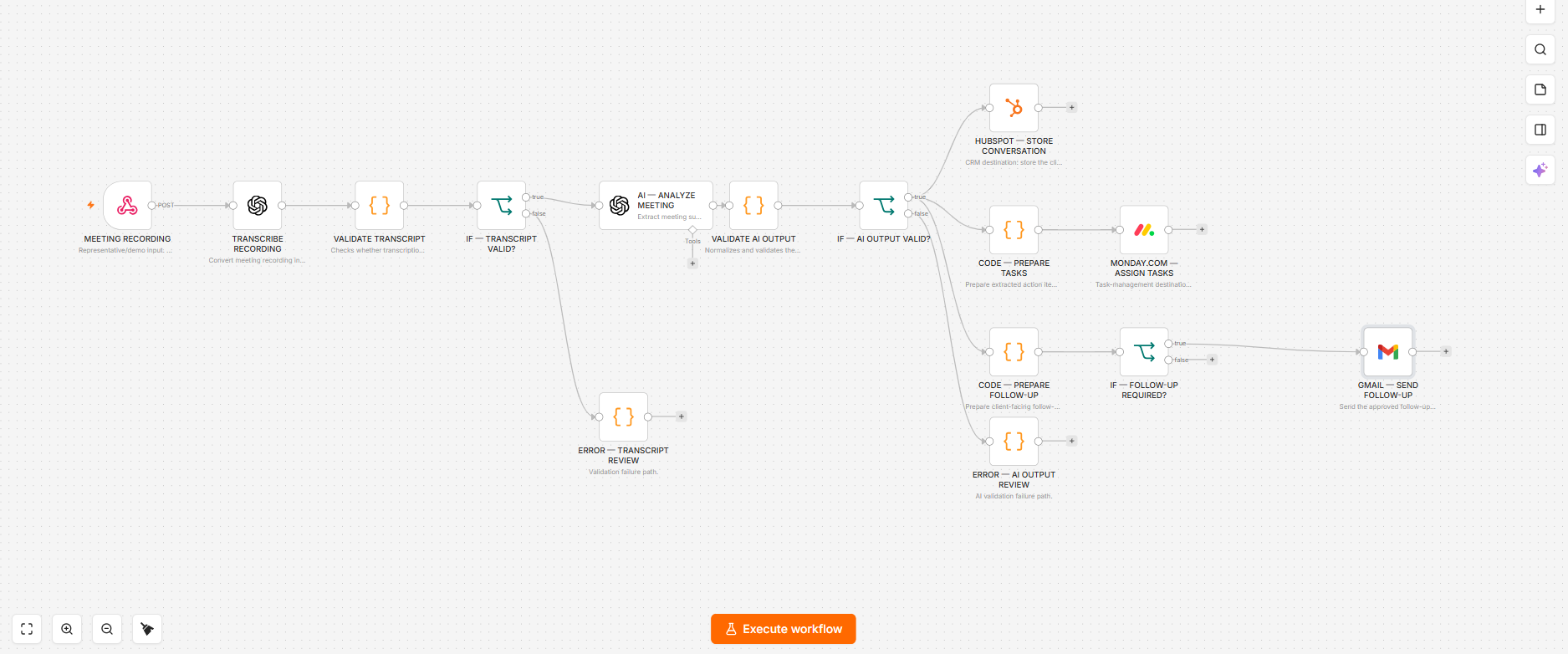
The Brihaspati Infotech engineered a complete AI meeting intelligence workflow. It runs in a straight line, with checks built in at the points where things typically go wrong.
The sequence is:
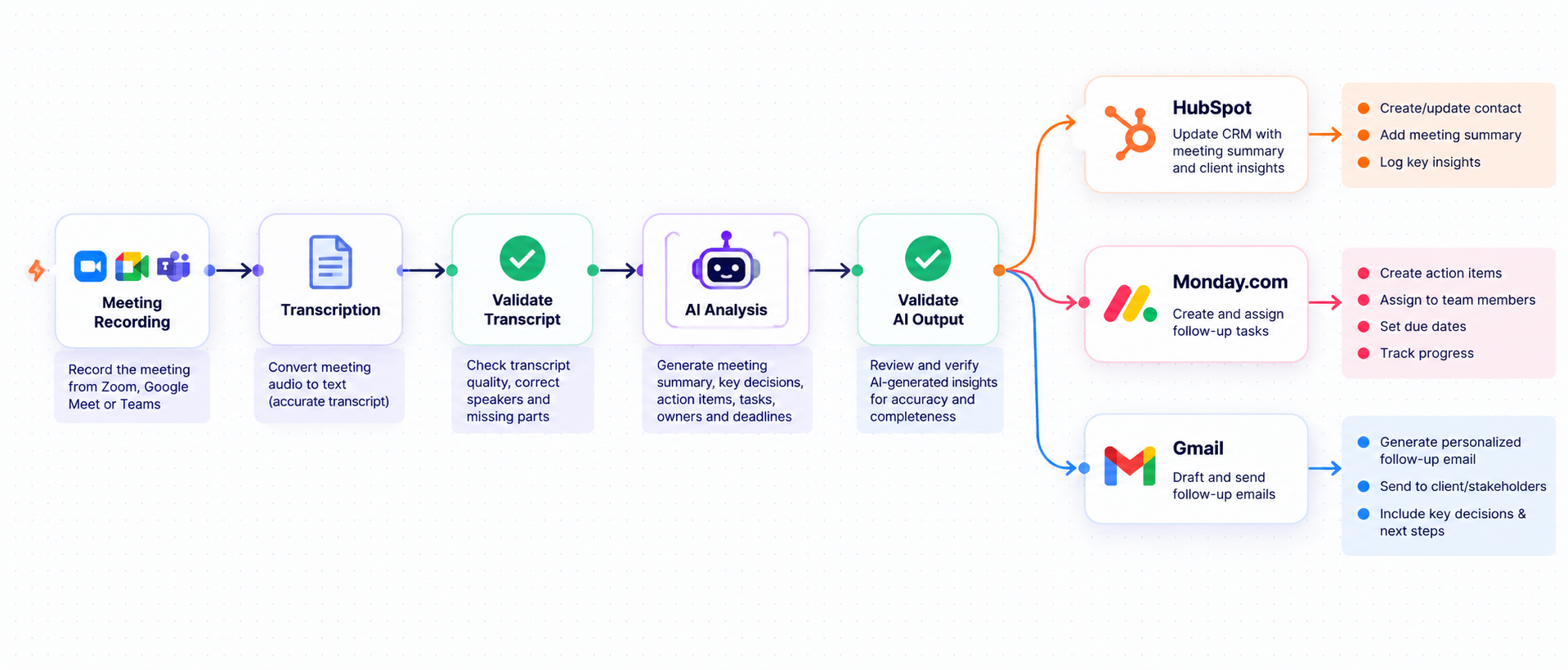
The client meeting is recorded, and someone transcribes it into text. The team checks that transcript before anything else happens, because everything downstream depends on it. A transcript that is incomplete, garbled or empty would otherwise produce confident nonsense at every later stage.
Once the transcript passes, the AI analysis step does the thinking. It determines what the participants discussed, which decisions they made, what requirements they stated, and which action items emerged from the conversation, along with who owns them.
That output is then checked too. Only after passing both checks does anything reach the tools the team actually works in.
01
Record and transcribe
The meeting is captured and converted into text
02
Validate the transcript
Confirms the text is usable before anything is built on it
03
Analyze
Decisions, requirements and action items are extracted.
04
Validate and deliver
Checked output flows into HubSpot, Monday.com and Gmai
THE DIFFERENCE
Why validate at every step?
This is the part that separates a workflow you can rely on from a demo that impresses once and disappoints later.
Most AI meeting tools take a simple path: transcribe, summarize, done. That works beautifully when the audio is clear, everyone speaks in turn and the conversation follows a tidy structure. Real client meetings are rarely like that. People talk over each other, drop calls, join from a car, fill half the discussion with something unrelated, and someone makes the key decision in a throwaway sentence near the end.
So the system does not simply trust the AI and pass its output along. The team validates every transcript and every AI output before it moves forward. If something fails validation, the system routes it to a review path instead of breaking the workflow.

Bad transcripts
Garbled audio produces confident nonsense downstream
Wrong action items
Real people get assigned tasks nobody agreed to
Dirty CRM data
Incorrect notes quietly pollute the customer record

Failures
The workflow breaks, instead of routing to a quick human review
That last detail is worth sitting with. There are two ways a workflow can fail. It can stop, which is annoying but visible. Or it can continue with bad data, which is far worse, because wrong information flows silently into your CRM, assigns wrong tasks to real people, and sends a follow-up email full of errors to a client. By the time anyone notices, the damage is done and they have lost trust in the system.
Routing failures to human review solves both problems. Nothing breaks, nothing silently corrupts your records, and a person handles the small number of cases that genuinely need judgment.
This reflects how The Brihaspati Infotech builds automation generally, automate the repetitive work, and route anything uncertain to a person rather than guessing.
THE OUTPUT
What lands in each tool?
Once the output has passed validation, it flows into the three tools the client’s team already used every day. That matters, because a system asking people to work somewhere new usually fails regardless of how good it is.
The conversation is stored in HubSpot, so the customer record reflects what was actually discussed. Anyone picking up that account later sees the context without asking a colleague to remember it.
Action items are extracted and assigned in Monday.com, with owners attached. The commitments made on the call become real, visible tasks rather than lines buried in someone’s notes.
Follow-up emails are prepared and sent via Gmail — and this part carries an important qualifier: only when required. Not every meeting needs a follow-up email, and a system that sends one every time trains people to ignore them. Restraint is a feature.
THE RESULT
What changed for the client?
The client saw 50% less time spent on meeting administration, running on a system that has proven reliable in daily use.
Two things are worth noting about that figure. First, it is administration time, not meeting time. The workflow does not shorten meetings or reduce how many happen. It removes the work that used to follow them.
Second, the hours saved are not the whole benefit. Because the process now runs the same way every time, things stop slipping. Every meeting produces a CRM record. Every action item reaches a task board with an owner. Follow-ups go out promptly rather than three days later when someone finally clears their inbox. Consistency of that kind is hard to put a number against, but any team that has lost work through a missed follow-up understands its value.
THE COMPARISON
How is this different from an AI note-taker?
This question deserves a direct answer, because AI note-takers are now everywhere and many are genuinely good.
An AI note-taker listens and summarizes the meeting for you. The result is a document. Someone must read it, assess what needs doing, update the CRM, create the tasks, assign them and write the follow-up email. The tool does the writing, your team does the work.
A meeting intelligence workflow carries the output through to completion. The CRM is updated. The tasks exist and have owners. The follow-up is sent. Nobody copies information from one screen into another.
There is a telling pattern in the data here. Despite the adoption of AI meeting tools by most organizations in 2025 and 2026, the number of meetings remains steady or increases slightly. It is used to address the problem of excessive meetings, not to eliminate it. That fits the argument exactly, summarizing was never the expensive part.
So the real question is not whether AI can summarize a meeting. It obviously can. The question is why your team should still be doing everything that happens after one.
WHO ELSE
Who else needs this?
Any business where client conversations create follow-up work will recognize this problem, though the details differ.
01
Agencies and consultancies
run client calls that generate requirements, scope changes and commitments. When you lose one of those in a notes document, it creates awkward conversations later about what was agreed.
02
Sales teams
live in the CRM, and CRM hygiene is a permanent complaint. Reps dislike data entry, so they do it badly or late, and pipeline reporting suffers for it. A workflow that updates records automatically removes the argument entirely.
03
Professional services firms
accounting, legal, financial advisory, need an accurate record of client instructions, often for compliance reasons as much as operational ones.
04
Recruitment agencies
run high volumes of candidate and client calls, each producing notes, next steps and follow-ups that must reach the right system quickly to stay competitive.
05
Customer success teams
hold regular check-ins where issues surface. Those issues need to become tickets and tasks, not bullet points in a document nobody reopens
BEFORE YOU BUILD
What should you check before building one?
Four questions are worth settling before any development starts. None are obstacles, but each is far cheaper to answer now than after launch.
Recording consent. This is the most important one for US businesses. Several states, like California, Massachusetts, Illinois, Florida, Pennsylvania, among others, require all participants of a conversation to consent before it can be recorded.
Because the recording happens at the conversation’s start, these states need to embed the agreement process within the meeting’s initiation procedure, not as an afterthought. Talk to a qualified attorney about your specific obligations.
What the AI may act on automatically. Updating a CRM record is low risk. Sending an email to a client is not. Decide in advance which steps run automatically and which need a person to approve them. Many teams start with emails that they hold for review and release that control once they establish trust.
Who reviews the exceptions. A review path only works if someone actually owns it. Decide who will check the flagged items and how quickly, or the queue will become a place where you forget work.
What your tools expect. Every CRM and task system has its own fields, formats and rules. Much of the real engineering in a workflow like this is in making AI output fit those structures cleanly, so the data arriving is genuinely usable rather than technically present.
WRAPPING UP
How do you start?
The most useful first step is not choosing an AI tool. It is writing down what your team actually does in the thirty minutes after a client call, every step, every system touched, every small decision made along the way.
That list is almost always longer than people expect, and it tells you two things immediately. It shows where the time really goes, which is rarely where anyone assumed. And it shows which steps are mechanical enough to automate safely and which genuinely need a person’s judgment.
From there, you can build a workflow around your existing tools rather than replacing them. That is deliberately how The Brihaspati Infotech approaches this work, connecting the systems a team already uses, so nobody has to learn a new place to work.
The team builds AI automation and workflow systems for businesses across the US, from a single process like this one to complete operational workflows. Every build follows the same principle demonstrated here, automate the repetitive work, validate the output, and route anything uncertain to a person instead of guessing.
If meeting administration is eating your team’s week, book a free consultation. In one short conversation, you will clearly see which parts of your process you can automate safely, what it would take to build, and what kind of time saving is realistic for a team your size.
Disclaimer: References to third-party products or companies are informational and do not imply affiliation, association, endorsement or partnership.