
 By
By 
- An AI avatar platform combines an animated character, a natural voice and an AI that decides what to say and the AI part is where success or failure is decided.
- Demand is rising rapidly. Grand View Research estimates the market for artificial intelligence avatars at $808.4 million in 2025 and projects $7.9 billion by 2033, with the US being the biggest market by far.
- You have to pay twice: once to host the platform and again whenever a visitor engages with it. Managed real-time avatars usually cost about $0.10 to $0.37 for each active minute.
- In the US, several laws apply at once: accessibility rules, state wiretap laws, AI disclosure laws, privacy laws, and biometric and voice rights.
- Chatbot wiretap lawsuits are the fastest-growing type of AI lawsuit against businesses, so consent and disclosure need designing in from day one.
- The Brihaspati Infotech recently built the conversational AI layer for a long-established US avatar platform, replacing a third-party chatbot service with a system the platform now own
THE BASICS
What is an AI avatar platform?
It is a talking, animated character that lives on your website or app. Visitors can ask it questions by speaking or typing, and it answers out loud with a moving face, a bit like a video call with a friendly help desk assistant.
It might welcome visitors, explain your products, guide someone through signing up, or answer questions about your prices and policies.
Building an AI avatar platform in the US means getting four things right at the same time. The avatar has to look and sound natural. It has to give correct answers. It has to stay affordable as more people use it. And it has to follow a growing list of US laws. Most businesses plan carefully for the first one and get surprised by the other three.
Every avatar is made of three parts working together.The first is the face: An animated character that blinks, gestures and moves its facial muscles in a manner consistent with its speech. The second is the voice: Software that converts text to speech and often speech back to text, so the avatar can comprehend verbal questions. The third is the brain: An artificial intelligence (AI) that comprehends every query and determines a suitable reply.
The face and voice are mostly solved problems today. You can get them from well-known companies. The brain is where most of the real work, cost and risk sits, which is why this guide spends most of its time there.
THE US MARKET
Why US businesses are investing in AI avatars?
Businesses across the country are adding avatars because they keep running into the same problems. Customers want help at any hour. Good support staff are expensive and hard to hire. And a plain text chatbot often feels cold and robotic.
The numbers show how quickly this is growing. Grand View Research says the AI avatar market was worth $808.4 million in 2025 and expects it to reach $7.9 billion by 2033, growing about 32.9% every year. North America made up the biggest share in 2025, at 38.3%, and the US was the largest single country. The same research found that customer service was the most common use, making up 33.1% of the market.
There are also reasons that are especially strong in the US. Many service businesses have struggled for years to find and keep front-desk staff. The country spans 6 time zones, so a business in Ohio gets questions from California several hours later, and from shoppers looking at midnight. Tens of millions of Americans speak Spanish at home, but most small businesses cannot afford to have bilingual employees on every shift. An avatar handles all three, since it is available 24/7 and can speak multiple languages.
One word of caution: different research companies give very different market sizes, because they each count different things. Some include only talking AI assistants, while others add video game characters and online influencers. They all agree the market is growing fast, but treat any single number as a rough estimate.
THE PAYOFF
What are the benefits of an AI avatar?
The biggest benefit is simple: an avatar handles work your team cannot keep up with. A person can only help one customer at a time, works set hours, and gets tired. An avatar can talk to hundreds of visitors at once, at any time of day, with the same patience every time.
Beyond that, a good avatar gives the same correct answer every time, so customers do not get different information depending on who picks up the phone. It can switch between English, Spanish and other languages without you hiring extra staff. Many visitors also find a face and a voice friendlier than a text box, especially when something needs a longer explanation.
There is a hidden benefit too. Every conversation is saved, so you can read exactly what visitors are asking. Many businesses discover questions their website never answered, and fixing those gaps improves the whole site, not just the avatar.
That said, an avatar only helps when it solves a real problem. One that guides visitors through a tricky product or process usually helps a lot. One that pops up during a quick checkout can feel annoying and may even cost you sales. Put it where people genuinely need help.
What a well-placed AI avatar delivers

24/7 coverage
Answers after hours, on weekends and across every US time zone
Consistency
The same correct answer every time, from every conversation
Multilingual reach
English and Spanish speakers served without extra hires
Customer insight
Every question logged, revealing gaps on your website
WHAT TO BUILD
What features does an AI avatar need?
It is tempting to judge an avatar by how real the character looks. In practice, the look matters much less than what happens behind it. A beautiful avatar that gives wrong answers damages trust quickly. A simpler one that always answers correctly earns trust just as quickly.
On the visitor’s side, the avatar needs smooth animation and accurate lip movement, because badly matched lips are one of the fastest ways to make it feel fake. It needs a natural voice in the languages your customers speak — companies such as ElevenLabs and Microsoft’s Azure AI Speech provide this. It should also understand spoken questions, so visitors can simply talk, which is especially helpful on phones.
The most important feature, however, is one visitors never see: the avatar must answer using your own business information, not general facts from the internet. It also needs an easy way for you to update that information, so the avatar stays correct when your prices, hours or policies change. Good platforms let you adjust how the avatar behaves as well, such as keeping answers short or making it more formal. After all, a bank’s avatar should not sound like a toy store’s.
A few features protect your business. The avatar must be able to pass visitors to a real person, a contact form or a phone number when it cannot help. It should clearly tell visitors they are talking to AI and ask permission before recording the conversation — something that is becoming a legal must in the US. It should keep a record of conversations, include limits that stop costs running out of control, and handle any personal details visitors share safely.
Finally, you need a simple control panel to manage it all, a way to test changes privately before customers see them, and reports that show how the avatar is performing. Notice that only the first few features are about the character itself. The rest decide whether the avatar tells the truth, stays affordable, keeps you legally safe and stays easy to run.
UNDER THE HOOD
How does an AI avatar work?
You do not need to be technical to understand how an avatar works. The easiest way is to follow one question from start to finish.
Imagine a visitor on a moving company’s website asks out loud, “Do you move pianos, and how much extra does it cost?” First, the avatar listens, and software turns the spoken question into written words. Next, the system checks what kind of question it is — a normal question, a request to speak to a person, or something the avatar should politely decline.
Then comes the most important step. The system searches the moving company’s own information, such as its service list and price guide, and pulls out the parts about piano moving. The AI reads the visitor’s question together with that information and writes a reply based on the company’s real facts, not a guess. Before anything is said aloud, a well-built system double-checks that the answer is backed up by the company’s information.
Finally, the voice software speaks the answer, the character’s lips move in time with the words, and the conversation is saved. If the avatar could not answer, that question is flagged so the business can add the missing information later. All of this usually happens in just a few seconds.
Why the avatar must use your information
On its own, an AI knows a lot about the world in general. However, it knows nothing about your business — your prices, your return policy, your service area or your opening hours. If you ask it a specific question, it will either refuse to answer or, worse, make up something that sounds believable.
The fix is to connect the avatar to your own information and have it look things up before every answer. Experts call this “grounding.” Setting it up means gathering your documents, website pages and FAQs, turning them into plain text the system can read, and organizing them so the system can find the right answer quickly, even when a visitor uses different words than you do. Get this right and the avatar becomes genuinely useful. Skip it, and you have built an expensive way to give wrong answers with a friendly face.
Where the character is drawn
There is one more architecture choice, and it affects your budget more than almost anything else: where the avatar’s animation is created.
01
Server-side rendering
creates the avatar’s video on powerful remote computers and streams it to the visitor, like a live video call. It can look very realistic. The catch is that you pay for server time during every minute of every conversation, so costs climb as usage grows.
02
Browser-side rendering
sends lighter animation instructions to the visitor’s own device, which draws the avatar itself. The look is usually more stylized than photo-realistic, but costs stay much flatter as usage grows, because the heavy work happens on the visitor’s computer or phone.
Neither option is wrong. A luxury brand showing a photo-realistic spokesperson to a small number of high-value visitors might happily pay for server-side rendering. A business expecting thousands of support conversations a month usually needs the flatter costs of browser-side rendering. Make this choice early, before any design work begins.
THE NUMBERS
How much does an AI avatar cost?
An AI avatar comes with two separate bills. The first is the building cost, which you pay once to create or set up the avatar. The second is the running cost, which you pay every month for every conversation, for as long as the avatar is live. Most businesses focus on the first bill, but the second one often ends up mattering more.
Most businesses focus on the first bill. In practice, the second one often ends up mattering more.
The build cost
The one-time cost depends mainly on which path you choose and how much your avatar needs to do. The biggest factors are:
01
Your path
Buying a ready-made avatar tool involves little more than setup. Integrating licensed avatar technology into your own software is a moderate project. Building a fully custom platform is a genuine development project.
02
How much knowledge it needs
An avatar answering questions from a few pages of FAQs is simple. One drawing on thousands of product documents, in several formats, takes far more setup and testing.
03
How many languages and voices you need
Each additional language adds testing work to make sure answers stay accurate.
04
What it connects to
Linking the avatar to your CRM, booking calendar, product database or help desk adds integration work.
05
Whether it takes actions
An avatar that only answers questions costs far less to build than one that books appointments, looks up orders or processes requests.
06
Compliance requirements
Healthcare, finance, education and anything involving children require extra privacy and security work.
In a custom build, most of the budget goes into the knowledge layer, the integrations and the testing, not into the character itself.
The running cost
The running cost comes from several services working together in every conversation: creating the moving character, the AI that writes answers, the software that understands speech, the voice that speaks, and the servers that keep it all running. For lifelike avatars streamed from remote computers, published prices from avatar companies usually range from about $0.10 to $0.37 for every minute of conversation, according to a July 2026 comparison of company pricing pages. The same comparison estimated that a custom-built system costs roughly $0.06 to $0.12 per minute in computing power.
To picture what that means, here is a rough example at about $0.20 per minute:
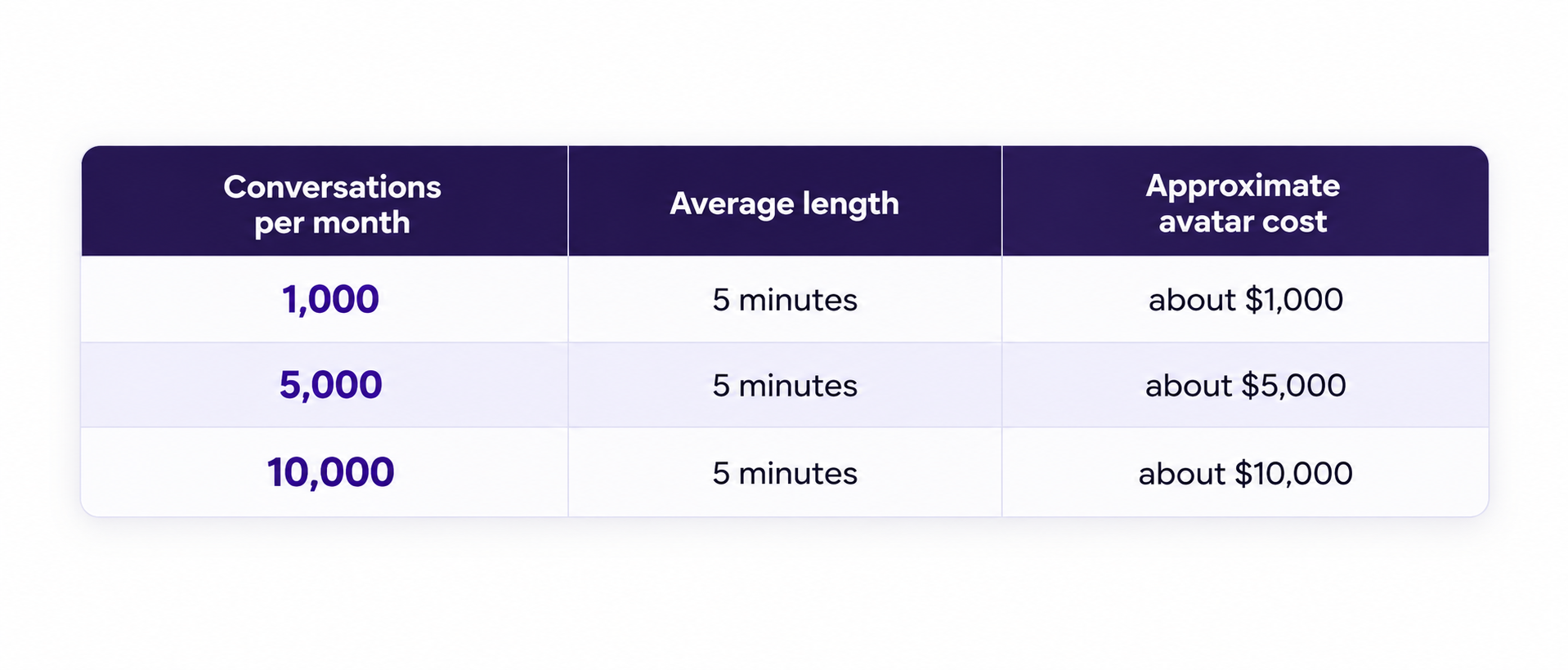
A rough illustration only. Real prices vary by company and change often.
Three things often catch businesses by surprise. First, the per-minute avatar price is rarely the whole bill, because many companies charge separately for the AI, the speech understanding and the voice. Second, the clock often starts when a conversation window opens, not only while someone is talking, so an avatar left open in a browser tab can still cost money. Third, monthly minutes often expire, so if your usage goes up and down, you may pay for minutes you never use.
The lesson is simple. Before choosing anything, estimate how many conversations you expect each month and how long each one will last. That one calculation often decides the whole project.
THE US RULES
What US laws apply to AI avatars?
This is the section most avatar guides skip, and it is the one that can cost a business the most.
There is no single US law for AI avatars. Instead, several different laws apply at the same time, some from the federal government and some from individual states. The rules are also changing quickly. In the first weeks of 2026 alone, 78 chatbot-related bills were filed across 27 states. At the same time, the federal government has said it may challenge some state AI laws, so parts of the picture are still unsettled. Here are the six areas every US business should understand.
1. Recording conversations
This is currently the biggest legal risk. Several states, including California, Massachusetts, Illinois, Florida and Pennsylvania, have wiretap laws that require everyone in a conversation to agree before it is recorded. Lawyers are increasingly arguing that website chatbots break these laws when they record conversations — or share them with outside AI companies — without the visitor’s agreement.
These lawsuits are growing fast. They rose from just 2 in 2021 to 30 in 2025, making them the fastest-growing type of AI lawsuit against businesses. Because damages can be claimed for each conversation, small and mid-sized businesses are common targets, not just big companies. The safest approach is to show a clear message at the start of every conversation saying it may be recorded and handled by AI, and to get the visitor’s agreement first. A privacy policy hidden at the bottom of your website is usually not enough..
2. Telling people they are talking to AI
More and more states require businesses to tell customers when they are talking to AI instead of a person. Utah led the way. Since May 1, 2024, its law has required businesses to admit they are using AI if a customer asks, and professionals in fields like healthcare, law and finance must say so at the start of certain conversations. Maine and New Jersey require the same kind of notice when a bot is involved in selling or advertising products. Even where no state law applies, the Federal Trade Commission can treat hiding a chatbot as misleading customers.
The simple rule is to make it obvious from the very first moment that your avatar is AI. A realistic human face makes this even more important, because visitors are more likely to assume they are talking to a real person.
3. Protecting personal information
Visitors often share names, email addresses, phone numbers and order details with an avatar. California’s privacy law, and a growing number of similar laws in other states, give people rights over this kind of information, including the right to know what is collected and to ask for it to be deleted. The safe approach is to collect only what you actually need, explain clearly what you keep and why, decide how long you store conversations, and have a working way to delete someone’s information when they ask.
4. Using a real person’s face or voice
If your avatar is based on a real person — built from an employee’s photo, for example, or using a copy of someone’s voice — extra laws apply. Some states treat a person’s face shape and voice pattern as sensitive body data. Illinois requires written permission before collecting it, and Texas and Washington have similar laws. People also have rights over how their face and voice are used in business. Tennessee’s ELVIS Act, passed in 2024, specifically protects people’s voices from being copied by AI without permission.
So if you base your avatar on a real person, get their clear written permission and keep it on file. Alternatively, choose a ready-made character and a computer-made voice, which avoids the
5. Accessibility
Lawsuits over websites that disabled people cannot use properly have become common in the US under the Americans with Disabilities Act (ADA), and many target smaller businesses. A talking avatar can genuinely help some visitors, but here is the honest truth that many companies blur: an avatar does not make your website ADA compliant.
Compliance depends on your whole website following accessibility standards such as the Web Content Accessibility Guidelines (WCAG), which cover things like clear page layout, working without a mouse, readable colors, and text descriptions for images. The avatar itself also needs captions for what it says and an option to type instead of talk. Think of the avatar as an extra on top of an accessible website, never a replacement for one, and be wary of any company promising compliance through a single add-on.
6. Rules for specific industries
Some industries carry extra requirements. Healthcare businesses must consider HIPAA if the avatar handles patient health information. Anything aimed at children under 13 must follow COPPA, which requires verifiable parental consent before collecting personal information. Financial and legal businesses face their own professional rules about what an AI may say.
US compliance checklist for AI avatars
01
Recording consent
Notify visitors and get agreement at the start of every conversation
02
AI Discloure
Make it obvious from the first moment that the avatar is AI
03
Faces and Voice
Get written consent from anyone whose likeness or voice is used
04
Accessibility
Build on a WCAG-accessible site, with captions and a typing option.
This section is general information, not legal advice. Laws differ between states and change quickly, so speak with a qualified US attorney before launching.
THE NEXT STEP
When does an avatar become an AI agent?
A basic avatar answers questions. An AI agent goes a step further and actually gets things done.
Picture the difference on a service company’s website. A basic avatar tells a visitor which services are available. An agent-powered avatar asks a few questions about the job, checks the calendar for free time slots, books the appointment, sends a confirmation email, and passes anything unusual to a person. In other words, it turns from a talking FAQ into something much closer to a virtual employee.
That extra power also brings extra responsibility. An avatar that can take real actions needs clear limits on what it is allowed to do, a full record of everything it did, and a reliable way to hand tricky situations to a human. For most businesses, the smart path is to start with an avatar that answers questions correctly, then add one action at a time — booking first, perhaps, then order tracking — testing each one carefully before moving on
WHAT GOES WRONG
Where do avatar projects go wrong?
Most failed avatar projects fail for predictable reasons, and nearly all of them are avoidable with planning.
01
Treating the character as the product
Teams pour their budget into making the character look impressive and rush the knowledge layer. The result looks great in a demo and gives poor answers in real life
02
Skipping grounding.
An avatar answering from general internet knowledge will confidently state the wrong opening hours or an old price. Visitors rarely give it a second chance
03
Offering no way out
When the avatar cannot help and gives visitors no route to a person, every difficult question becomes a lost customer and a frustrated one.
04
Ignoring running costs
A server-rendered avatar can turn a successful launch into an unaffordable one, because the more people use it, the more it costs
05
Whether it takes actions
An avatar that only answers questions costs far less to build than one that books appointments, looks up orders or processes requests.
06
Forgetting consent and disclosure
Launching without a recording notice or AI disclosure invites exactly the kind of lawsuit that is growing fastest in the US
07
Letting knowledge go stale
Prices change, policies update, products come and go. An avatar whose information is never refreshed slowly becomes wrong.
THE WIDER SHIFT
How does this connect to AI search?
Something valuable happens once you build an avatar’s knowledge layer, and most businesses miss it entirely.
To ground an avatar properly, you have to organize your business information into clear, structured, easy-to-read content. Your prices, policies, services, service areas and common questions all end up written plainly and stored where software can find them.
That turns out to be almost exactly the work now needed to appear in AI search results. Tools like ChatGPT, Perplexity and Google’s AI Overviews answer people’s questions by reading web pages and quoting sources. They can only quote what they can clearly read and understand.
So a business that structures its information for an avatar has, in the process, also structured it for the AI systems deciding whether to recommend that business to someone searching. One piece of work serves two audiences: visitors on your own website, and the AI tools answering questions about your industry everywhere else.
That connection will only grow stronger as AI agents start browsing and comparing businesses on people’s behalf. An agent comparing three moving companies reads the same kind of structured content your avatar relies on.
THE DECISION
Should you build, integrate or buy?
There are three realistic paths, and the right one depends on what the avatar needs to do and how much you expect it to be used.
Buy an existing avatar tool. This is the fastest and cheapest way to start when a ready-made product fits your needs. You pay a subscription, choose a character, add your knowledge, and place the avatar on your website — often within days. The trade-off is less control over features, data handling and costs at high volume.
Integrate avatar technology into your own product. If you build software and want avatars inside it, licensing existing character and voice technology is far more sensible than building animation from scratch. You control the experience while relying on proven technology for the hardest visual parts.
Build a custom platform. This makes sense when you need something a ready-made tool cannot provide: a specialized knowledge system, strict compliance requirements, deep links into your internal systems, full control over your data, or lower running costs at very high volume.
As a rough guide, most US businesses should start with the first option. Software companies usually need the second. The third becomes worthwhile when the avatar sits at the heart of your product, or when your usage is high enough that monthly per-minute fees would cost more than owning the platform outright.
OUR WORK
What did The Brihaspati Infotech build?
The Brihaspati Infotech recently built the AI “brain” behind a long-running US avatar platform. The platform has been a client of the company for more than ten years.
The Problem: The platform’s avatars had been relying on another company’s chatbot service to hold conversations. That worked, but it came with real limits. The platform could not fully control which AI was used, where answers came from, how conversations behaved, or how the chatbot fitted into the rest of its product. In short, one of the most important parts of what it sold depended on someone else.
The Solution : The Brihaspati Infotech designed and built a replacement system from the ground up, using OpenAI’s technology, and moved the platform away from the outside service completely. Now the platform owns the technology behind its avatars’ conversations. Each business that uses the platform can set up its own assistant: choosing which AI model to use, setting how long and how formal its answers should be, adding its own brand details and instructions, and teaching it with its own files, text, website pages and questions and answers.
Behind the scenes, the system can read PDF and Word files and pull information from website pages, turning all of it into knowledge the assistant uses to answer questions. Every assistant answers from the information its own business supplied, rather than from general AI knowledge. Businesses get a simple control panel, a way to test their assistant privately before going live, and a record of activity. The team also added technical improvements to keep answers fast and standard security protections to keep accounts and passwords safe.
The new assistant has been live to users in beta since August 2026. Just as importantly, a core part of the client’s product is now something it owns and controls, rather than something it rents from another company. That project reflects how The Brihaspati Infotech approaches every avatar build: start with the information, plan the handoffs and permissions from day one, and work out running costs before the character is ever chosen.
If you are considering an avatar, a good first step is the free AI Readiness Audit. It shows how ready your website and information are for AI, including whether AI systems can understand your business well enough to answer questions about it — which is exactly what an avatar needs. The audit is free, and the results are yours to keep whether or not you go further.
Disclaimer: References to third-party products or companies are informational and do not imply affiliation, association, endorsement or partnership.